13 stands, zero paperwork - how we replaced a daily sheet with a live operations system
A produce business running more than a dozen field stands was reconciling every day on a handwritten sheet. We built them a web app that moves the entire workflow - from morning stock allocation to end-of-day cash close - onto a phone and a desktop dashboard.
In brief: 13 stands, two drivers taking turns, every day reconciled on a paper sheet - and an owner who only found out how it went in the evening when everyone returned to base. We built a system that eliminates the sheet, calculates cash automatically, and gives the boss a live view from anywhere, at any time.
A problem that grew with every new stand
The client sold seasonal fruit and vegetables at several points around the city. In the beginning - two or three stands, one driver, a daily sheet. It worked. When the number of outlets grew to more than a dozen and stock turnover accelerated, that same paper workflow began generating real costs.
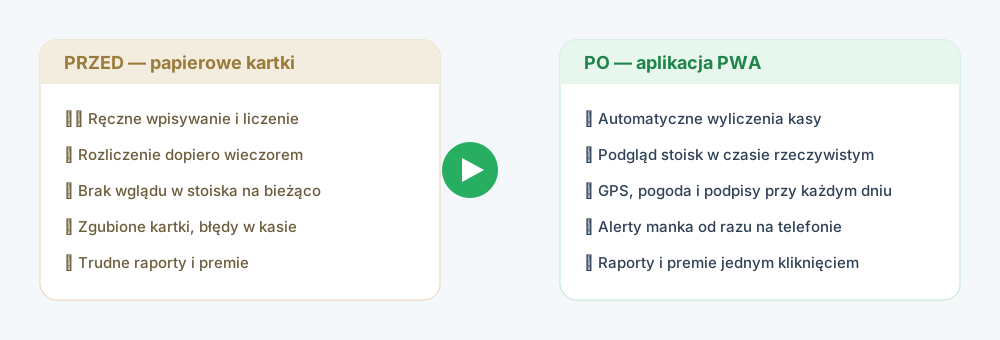
The specific pain points we heard at the first meeting:
- No visibility during the day. The owner had no idea how sales were going until the drivers returned to base in the evening. No operational decisions could be made mid-day.
- Manual calculation of shortfalls and bonuses. Takings, commissions, the difference between stock levels - all worked out on a calculator, with a risk of error at every step.
- Lost and illegible sheets. Paper in the field, in changing weather, is unreliable. A few times each season a day's reconciliation simply went missing.
- Hours spent on monthly summaries. Driver bonuses and stock summaries required hours of manual transcription into a spreadsheet.
The common denominator here is the absence of a single reliable data source - the same pattern we see in every Excel-to-system migration.
The decision: a system built around the actual process
Rather than forcing a generic tool onto an unconventional workflow, we built the application around how the business actually operates each day. We chose PWA (Progressive Web App) technology - it runs in a browser, installs on a phone without an app store, and crucially for field sales, it works offline.
The system has two views, each matched to a specific role:
- Driver panel - mobile-first, with large tap targets, usable one-handed while serving a customer.
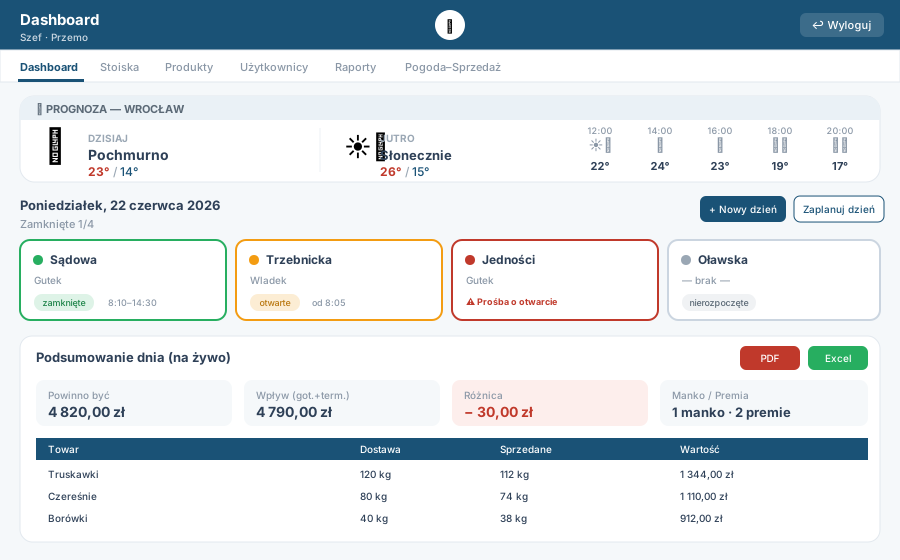
- Boss panel - desktop dashboard with a grid of all stands, tables, and reports refreshed in real time.
What a working day looks like after the rollout
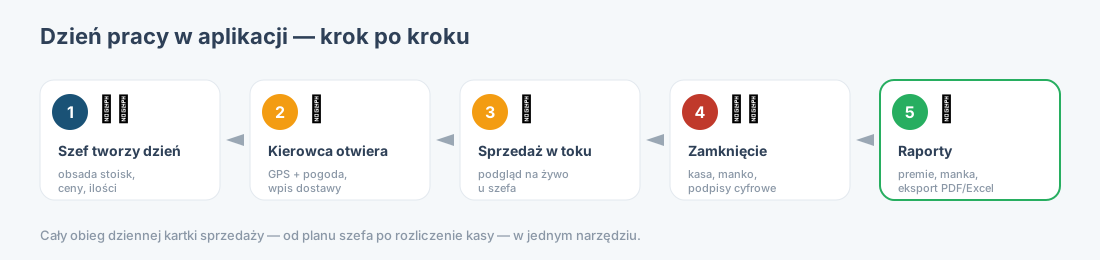
Morning - the boss plans the day
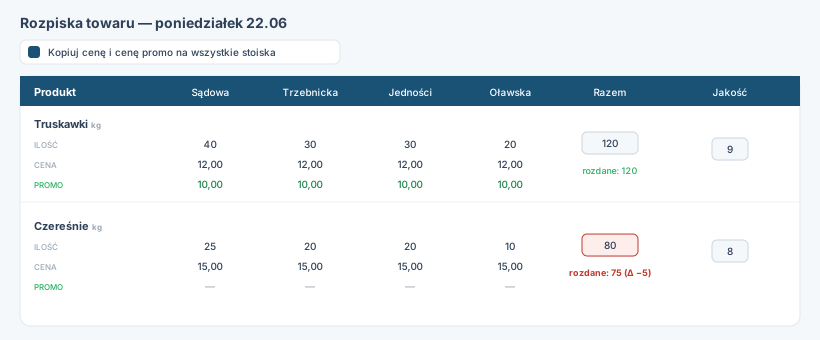
One click creates a new sales day that automatically copies the layout from the previous day - stands, drivers, quantities, and base prices. A small adjustment is all that's needed instead of filling everything in from scratch. The boss assigns staff, completes the stock allocation, and sets standard and promotional prices.
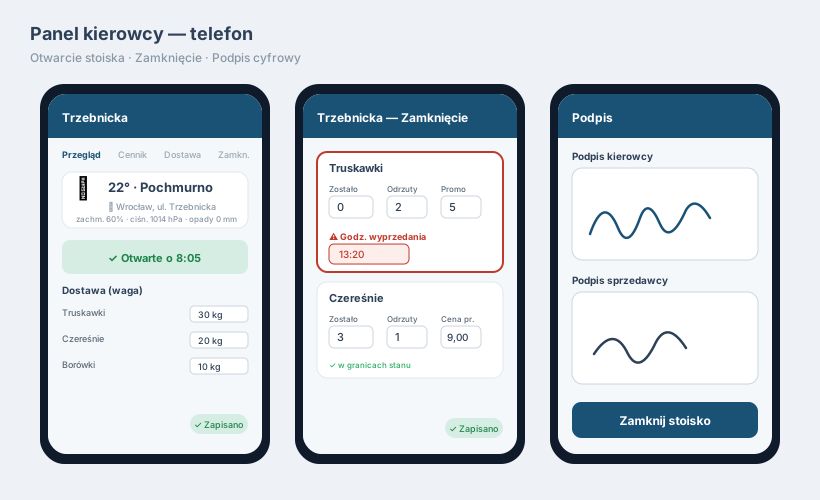
At the stand - the driver opens the point
The driver taps their stand tile and hits "Open". The app records the time, GPS location, and current weather, then prompts them to confirm the actual quantities of stock delivered. The entire tile on the boss's dashboard switches from grey to yellow - the stand is now shown as active.
During the day - the boss sees everything live
The dashboard syncs automatically, with no manual refresh. Stand tiles change colour (grey - yellow - green) and the cash summary updates in real time. The boss can see at a glance which stands are open, what total takings have been recorded, and whether anything looks off.
Evening - close-out and automatic reconciliation
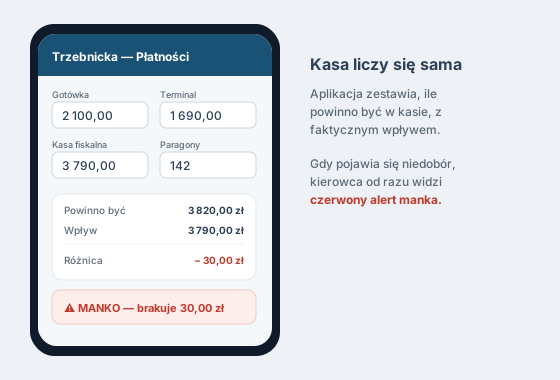
The driver enters remaining stock, waste, and promotional sales. The app calculates how much should be in the till and compares it against actual takings (cash plus card terminal). A shortfall is flagged with a red alert immediately. The day closes with a digital signature from the driver and the seller, drawn with a finger on screen - no printing required.
After the fact - reports and bonuses without spreadsheets
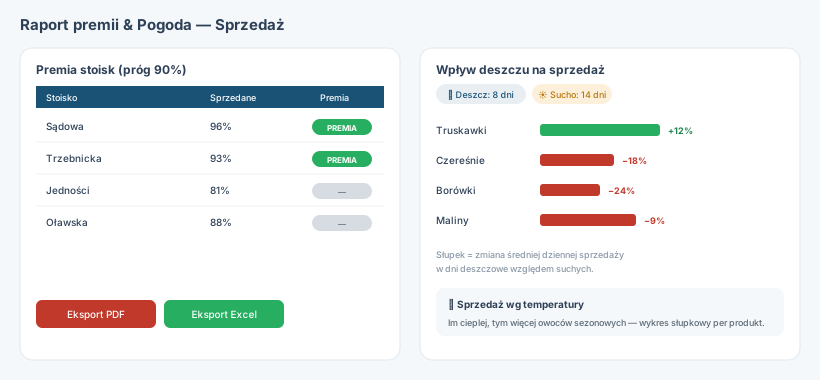
The boss opens the reports module and with one click exports to PDF or Excel: total company takings, percentage of stock sold, bonuses per stand, and average transaction values. An additional "Weather and sales" module shows how rain and temperature affect sales of individual products over time.
Key system features
| Area | What it delivers in practice |
|---|---|
| Sales days | Create a new day by auto-copying the previous day's layout |
| Automatic reconciliation | Takings, shortfalls, sell-through %, and bonuses calculated without a calculator |
| GPS + weather | Location and conditions recorded at open and close of every stand |
| Digital signatures | Driver and seller signatures required to close each day |
| Real-time sync | Boss dashboard refreshes automatically, no page reload needed |
| Reports and export | PDF and Excel, bonuses, average transactions, stock summaries |
| Weather-sales analysis | Correlation of atmospheric conditions with sales of individual products |
| PWA + offline | Installs on any phone, full operation without connectivity, auto-sync on reconnect |
Technology that stays out of the way
A good operational system should be invisible - staff do what they always do, and the app counts, stores, and reports in the background. We chose a stack that delivers stability and low running costs:
- Next.js 14 (React, App Router) + TypeScript - fast, type-safe frontend with a built-in API layer
- Supabase (PostgreSQL, Auth, Realtime, Storage) - database, authentication, live sync, and digital signature storage
- Tailwind CSS - consistent, mobile-first interface optimised for one-handed use
- PWA with offline mode - transactions stored locally, synced automatically when back online
- PDF generation and integration with a free weather API
- Hosted on Vercel - automatic deploys, scales without managing a server
A Supabase and Vercel architecture means low fixed costs and no infrastructure for the client to maintain. Security updates, backups, and scaling are handled by the service providers.
Measurable results

- Zero paper - the entire daily sheet moved to a phone
- Live visibility - the boss sees stand status in real time, not at end of day
- Fewer errors - cash, shortfalls, and bonuses are calculated by the app, not by a person with a calculator
- Full day documentation - timestamps, GPS, weather, and signatures on every close
- Reports in seconds - PDF and Excel export instead of hours of manual compilation
- 13 stands managed in a single system, updates under 1 second
"The best implementation is one that disappears into the background - the worker does what they've always done, and the tool counts, stores, and reports by itself."
FAQ
How much does a custom PWA cost for a business?
It depends on scope. A simple single-role system runs from several thousand euros. A full multi-role app with reconciliation, reports, and offline mode starts from tens of thousands. We provide a detailed quote after a free consultation. - See pricing models
What is a PWA and does it work offline?
A PWA installs on a phone directly from the browser - no Google Play or App Store needed. With an offline-first architecture, sellers work normally even without connectivity. Data syncs automatically when the connection is restored, preserving the original transaction timestamp. - More about PWA
Can you build something similar for a different industry?
Yes. We build web and mobile applications that replace paper and spreadsheets with a real working tool - for field sales, service point networks, maintenance teams, and distributed workforces. We scope the project around your specific process after a free consultation.
How long does implementation take?
For a well-defined process, a working MVP is typically ready in a few weeks. A full system with reporting, multiple roles, and offline support takes four to twelve weeks. We work in stages - core workflow first, then additional modules. - MVP in 6 weeks
Where do I start with digitising my business?
With the single most painful process - usually the one that lives on paper or in a spreadsheet and consumes the most time. We start with a free consultation and a process map, then build the tool around how you actually work - not the other way round. - Book a consultation
Let's turn your paper trail into a working system.
Free consultation and a quote within 48 hours - no commitment, with clear budget ranges.